학생 아파트
창보기
서비스 요금 없음
VR 보기
층 평면도
보증금 없음집주인 선물 수수료 없음
서비스 요금 없음
26학년도 예약 접수 시작
근처 레스토랑
근처 패스트푸드점
수도 전기 요금
버스 정류장 근처
24시간 보안
기차역 근처
92 침대
총 4층
2018년 건물
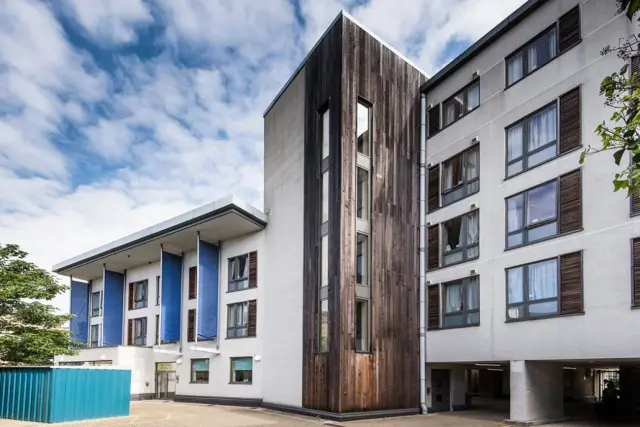
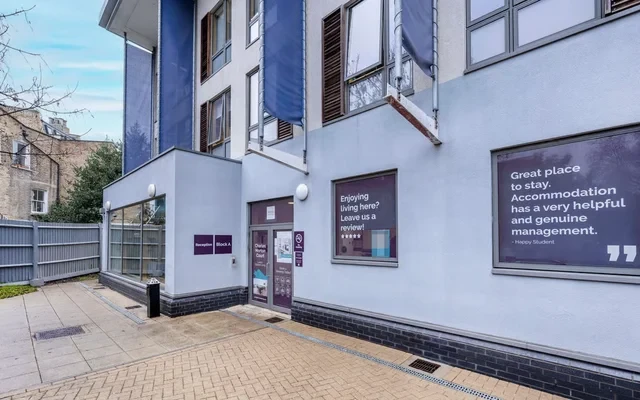
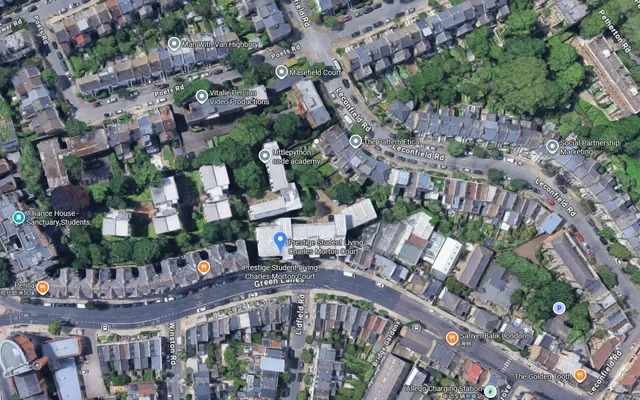
찰스 모턴 법원은 런던의 학생 숙소 중 하나로, 스튜디오와 전용 욕실을 제공합니다. Prestige Student Living 찰스 모턴 법원(N16 9BS)은 37-43 Green Lanes에 위치하고 있으며, 뉴잉턴 그린 북부 런던에는 캐논버리 역과 여러 주요 대학에 매우 가깝습니다. 런던 메트로폴리탄 대학교까지는 20분 버스 이동 거리이며, 시티 대학교 런던와 센트럴 세인트 마틴스까지는 33분 버스 이동 거리입니다. 북부 런던에 위치한 이 숙소는 중심 런던까지 짧은 거리에 있으며, Tesco Express, Argos, Ridley Road Market 등 많은 기본 편의 시설로 둘러싸여 있습니다. 실내 편의 시설로는 넉넉한 수납공간, 안락한 공동 라운지, 정원 공간, 세탁실, 자전거 보관소, 고속 인터넷 및 WiFi가 갖춰져 있습니다.
특징:
Prestige Student Living 찰스 모턴 법원은 학생들에게 스튜디오와 전용 욕실을 제공합니다. 각 방에는 편안한 침대, 책상 및 소파가 있습니다. Collegiate 찰스 모턴 법원은 다음과 같은 편의 시설을 갖추고 있습니다:
£300 캐시백
모든 공과금 포함
내용물 보험
TV와 당구대가 있는 공동 라운지
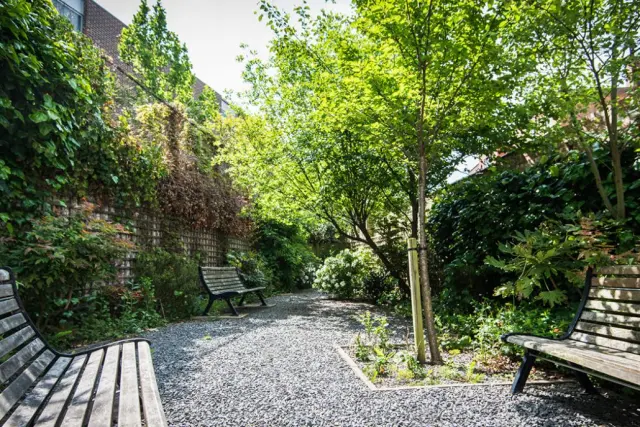
정원
세탁실
자전거 보관소
공동 주방
최대 100Mbps* 인터넷
위치 및 핫한 정보:
찰스 모턴 법원은 북부 런던의 뉴잉턴 그린에 위치하여 거주 및 학습에 편리합니다.
대학들: 찰스 모턴 법원은 UCL, KCL, 런던 메트로폴리탄 대학교, 시티 대학교 런던, 센트럴 세인트 마틴스, 그리고 웨스트민스터 대학교 학생들에게 이상적입니다.
슈퍼마켓: 일상 용품 구매를 위해 Tesco Express, Argos, 그리고 Ridley Road Market이 쇼핑 요구를 충족할 수 있습니다.
교통:
Prestige Student Living 찰스 모턴 법원은 제2구역에 위치하여 교통이 잘 발달된 지역입니다. 캐논버리 역은 아파트에서 10분 거리에 있습니다. 이는 인근의 주요 대학에 손쉬운 접근을 보장합니다.
런던 메트로폴리탄 대학교: 찰스 모턴 법원에서 20분 버스 이동 거리
시티 대학교 런던 및 센트럴 세인트 마틴스: 찰스 모턴 법원 학생 숙소에서 33분 버스 이동 거리
UCL, KCL, 그리고 웨스트민스터 대학교: 찰스 모턴 법원에서 40분 버스 이동 거리
보안 및 서비스:
Collegiate 찰스 모턴 법원은 항상 학생들의 안전과 안락함을 최우선으로 생각합니다. 이를 위해 많은 조치를 취하고 있습니다.
CCTV
24시간 보안
유지 보수 서비스
리뷰
2 리뷰
전체 리뷰
4.5
훌륭함
평점과 신뢰성에 기반한 학생 추천 숙소
종합 평점
5
4
3
2
1
沈**
UCL University College London
Charles Morton Court, 런던 | Premier Ensuite Plus | 51 주
5.0
이 아파트는 비교적 새롭고 환경이 매우 좋습니다. 저는 종종 그룹 활동에 참여합니다.
더보기
张**
UCL University College London
Charles Morton Court, 런던 | Premier Ensuite Plus | 51 주
4.0
접수는 매우 복잡하고 자극적이며, 환경은 조용합니다.
더보기
전체 리뷰
£279 /주
Security deposit £250
최저가 보장
기숙사 규정
Charles Morton Court FAQ
When is the due date for rent payment?
Please enter the Student Portal interface of your apartment, click Review My Offer to enter the contract review interface, click CLICK HERE TO VIEW THE TENANCY AGREEMENT in the lower right corner again or enter the registered email to check the rent payment deadline on the contract. If you need to pay the rent, you can return to the homepage and click Review/Pay Statement to view the details of the payment plan. The corresponding key information is [Balance] The current total amount to be paid for this payment item [Due Date] Payment deadline (format day/month/year) Please pay the rent before the due date
더보기
How to pay rent?
Please enter the Student Portal interface of your apartment, click Review/Pay Statement to enter the payment interface, then tick the items that need to be paid, and click pay to enter the payment interface. The apartment supports online credit card payment (credit card is supported) or bank transfer 1. For online credit card payment, please ensure that the payment card type is one of the following four types: Mastercard/Visa/Visa Debit/Visa Electron. Carefully fill in the cardholder information, and please ensure that the payment card has sufficient credit, and the bank is opened and supports payment behavior. Please note that payment cards do not need to be present in person. 2. For bank remittance, please contact the apartment to obtain the transfer account under the guidance of the consultant, and then complete the corresponding payment in the bank. However, please note that wire transfers can take several business days to arrive, so payment needs to be arranged in advance.
더보기
Is an installment purchase possible?
If you have a valid UK guarantor, you can choose to pay the rent in three installments, in September, January and April. If there is no valid UK guarantor, full rent must be paid 1 month before the start of the contract.
When is the due date for rent payment?
Please enter the Student Portal interface of your apartment, click Review My Offer to enter the contract review interface, click CLICK HERE TO VIEW THE TENANCY AGREEMENT in the lower right corner again or enter the registered email to check the rent payment deadline on the contract. If you need to pay the rent, you can return to the homepage and click Review/Pay Statement to view the details of the payment plan. The corresponding key information is [Balance] The current total amount to be paid for this payment item [Due Date] Payment deadline (format day/month/year) Please pay the rent before the due date
더보기
How to pay rent?
Please enter the Student Portal interface of your apartment, click Review/Pay Statement to enter the payment interface, then tick the items that need to be paid, and click pay to enter the payment interface. The apartment supports online credit card payment (credit card is supported) or bank transfer 1. For online credit card payment, please ensure that the payment card type is one of the following four types: Mastercard/Visa/Visa Debit/Visa Electron. Carefully fill in the cardholder information, and please ensure that the payment card has sufficient credit, and the bank is opened and supports payment behavior. Please note that payment cards do not need to be present in person. 2. For bank remittance, please contact the apartment to obtain the transfer account under the guidance of the consultant, and then complete the corresponding payment in the bank. However, please note that wire transfers can take several business days to arrive, so payment needs to be arranged in advance.
더보기
Is an installment purchase possible?
If you have a valid UK guarantor, you can choose to pay the rent in three installments, in September, January and April. If there is no valid UK guarantor, full rent must be paid 1 month before the start of the contract.
Due to delays, I communicated the Flexible Booking Policy to the apartment. When should I pay the re
Since the Flexible Booking Policy is reviewed and decided by the apartment case by case, there is no strict uniform standard. Please confirm your revised payment amount and payment deadline with the apartment separately after you successfully apply for the Flexible Booking Policy.
I have a special discount for the apartment when I make a reservation, how can I redeem it?
Please refer to the corresponding activity details provided by the apartment when you make a reservation, and then please accept the corresponding details with the apartment.
When I make a reservation, is the deposit I paid a deposit? How to refund?
The deposit is a deposit and is not deductible from the rent. After the booking is completed, your deposit will be handed over to a third-party agency in the UK to keep the deposit. It will be refunded according to the degree of damage to the room facilities (severe damage) until the end of the lease period when you check-out Some or all of the deposit may be deducted, so you must report for repairs in time if any facilities in the room are damaged)
더보기
Can I choose a roommate?
If you have other small partners who book together, you can contact our consultant teacher of uhomes, and we will try our best to help you arrange
Can I move in before paying the rent?
All rent due must be paid upon check-in.
Can I check in early?
If you need to check in early, please contact your consultant teacher. If there are vacancies in the apartment for the corresponding lease period, you can arrange early check-in after accepting the corresponding extra rent
Do I need to pay land tax?
If you are an eligible full-time student, you will be exempt from paying land tax. You must provide proof to the apartment that you are a full-time student
Do I need to pay property taxes?
If you are an eligible full-time student, you will be exempt from paying housing tax.
When can I check in?
You can check in at the beginning of the contract. If you arrive at the apartment during non-working hours, it is best to inform the apartment in advance so that the apartment can arrange check-in.
How do I collect my access card?
After completing the check-in process at the front desk, you can get the key card from the apartment front desk
Can someone else get the key card for me?
No, for security reasons, your key card can only be collected by yourself.
Can I keep pets inside the apartment?
No, no pets are allowed in the apartment.
What should I do if I need to report for repair?
1. Reporting repairs by using the apartment software 2. Reporting repairs through the front desk of the apartment
Can I smoke inside the room?
The apartment is non-smoking for safety reasons and has smoke alarms. If you need to smoke, please ask the front desk of the apartment where the corresponding smoking area is located.